An Overview of Google’s New Features for 2021
At the beginning of this year, we are presenting some of the new Google features announced for 2021. After reading our article, we invite you to test these programs yourself according to your interests and needs as a merchant. Test and Learn remains a golden rule!
Auto-Applied Recommendations (Beta)
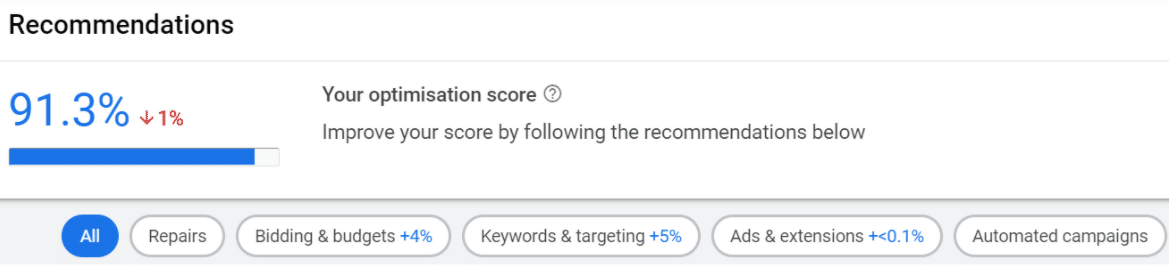
For several years now, all Google Ads accounts have had a “Recommendations” tab through which Google provides various suggestions to improve the overall optimization score of your campaigns. The ultimate goal announced by the Mountain View company: to take full advantage of your campaigns’ potential to improve their performance on the Search Network.
Recently, the company developed a new tool called Auto-Applied Recommendations. Still in beta, a whitelisting request, which may be approved or rejected, must be submitted to your account manager in order to activate it.
As its name suggests, the AAR tool automatically applies suggestions presented in your Google Ads account based on your campaign history, settings, and Google search trends:
- Bid changes (for manual campaigns);
- Target CPA and target ROAS adjustments (for automated campaigns);
- Adding or pausing keywords;
- Creating, modifying, and pausing ads;
- …
The launch of this tool once again demonstrates the direction Google has been taking for several years: the automation of Google Ads campaigns, driven by the effectiveness of machine learning. By using the targeting power of its algorithm, Google ensures that campaigns are managed according to its best practices.
However, you can select which automatic recommendations you want to activate in your Auto Applied Recommendations interface. This way, you retain control over what should and should not be automated.
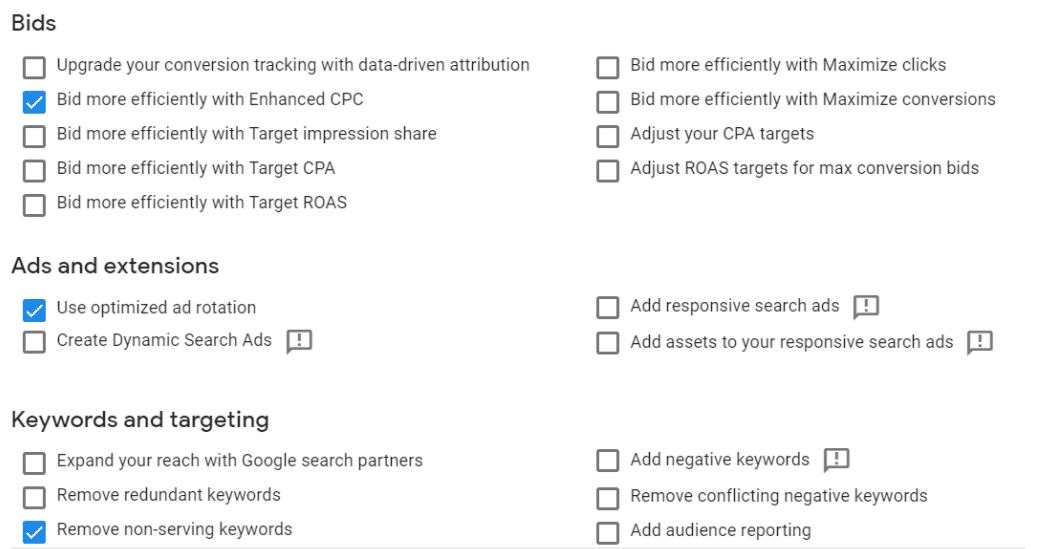
To save time, certain recurring and time-consuming tasks can be activated and therefore automated. These include removing redundant or conflicting keywords, pausing keywords that have generated no traffic, and creating new ads.
Google Ads accounts allow you to view the change history to see which recommendations have been applied automatically. However, be aware that this new feature has one significant limitation: a change that has been made cannot be directly undone.
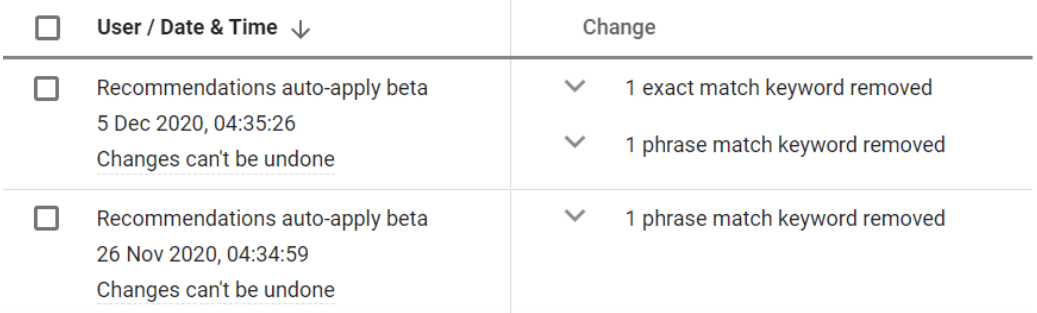
Finally, note that no automation can be applied to the budget cap, meaning the merchant retains complete control over their budget.
Our advice:
- Automate time-consuming tasks.
- For more strategic elements that directly impact your bids and objectives, test and analyze the results.
Image Extensions (Beta)
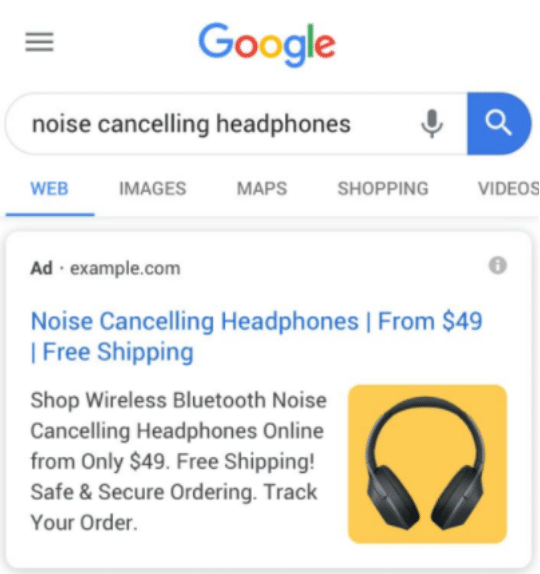
At Feed Manager, we had been eagerly awaiting the activation of this beta in France! For the past 2 months, it has been possible to set up image extensions (after an approved whitelisting request). These allow an image to be displayed to the right of your Google Ads ad (exclusively on mobile).
Our advice:
Make sure you comply with Google’s required specifications. Be sure to include an image related to your ad. Submit a high-quality image that showcases your products, service, or brand universe. Avoid using the same image for all your campaigns. And of course, test and make changes if necessary.
The results from activating this extension for some of our clients are promising for a testing phase. For now, this type of extension is displayed relatively infrequently, but once released, it should appear more often and generate significant traffic. Note that the CTR (click-through rate) is currently quite high: between 15% and 20% on some Search campaigns.
Dynamic Mode
Recently, it has also become possible to use “dynamic” mode for these image extensions. After crawling your website, Google retrieves an image and dynamically integrates it into the ad. This makes the extension quicker to activate. However, please note that you must certify that you hold all legal rights to the images on the ad’s landing page.
“New Customer Acquisition” Campaign (Beta)
If your overall strategy is focused on customer acquisition, if you are launching your first offers on Google Shopping or if, at every meeting, your manager points to the number of new customers, using “New Customer Acquisition” Smart Shopping campaigns can prove very useful.
Launched in 2020, this type of Smart Shopping campaign differs from “standard” Smart Shopping campaigns because of its final conversion objective: the value of a new customer is added to the purchase value.

For this, Google needs to be able to distinguish new customers from existing customers. Several methods are available. The most common and undoubtedly the simplest is automatic detection by Google (via the Google Ads tag implemented on your website), which automatically creates an audience list based on the last 540 days of campaign activity and tracked purchases. By integrating this new customer data into your Google Ads account, your Smart Shopping campaign’s bidding strategy will evolve.
Ultimately, the objective of this campaign is to better allocate your budget according to the visitor’s qualification. The aim is to indicate to the algorithm a different profitability target depending on whether a product is purchased by a loyal customer or a new customer. Budget and advertising efforts can therefore be reduced as soon as a known customer is identified.
Our advice:
Carefully determine the value of a new customer by taking into account all the necessary KPIs (acquisition source, average order value, customer lifetime, number of purchases over a given period, etc.). After activating this new campaign, monitor its learning period of approximately one month, avoiding any major changes as much as possible.
New LIA In-Store Pickup Options
Local Inventory Ads now offer the possibility of displaying two options:
- In-store pickup (Pick up later);
- Curbside pickup (Curbside).
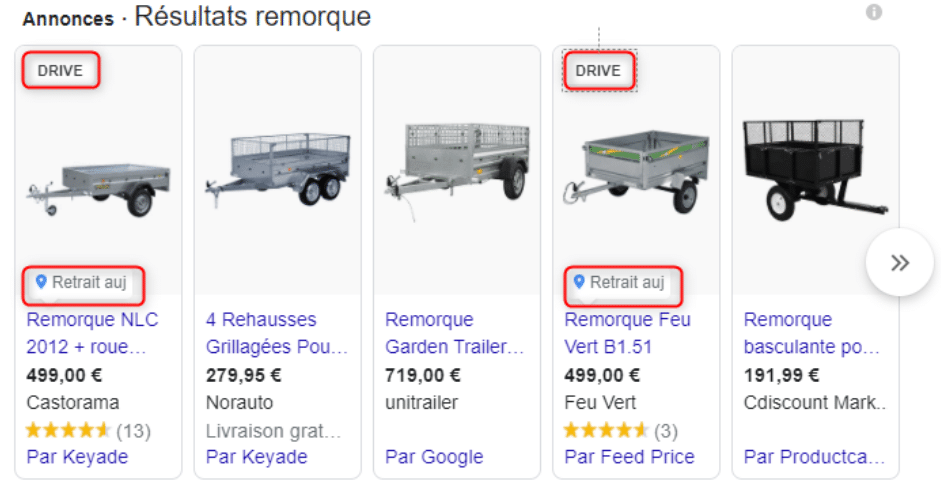
To activate them, certain conditions must be met:
- For Pick up Later: the time allowed for in-store pickup must be clearly indicated on the website during checkout;
- For Curbside: the option must be indicated on the website.
In addition to displaying these options on the merchant’s website, the feeds must provide additional attributes, either in the LIA feed if you already use one, or in the PLA feed where applicable:
- Identification of products eligible for in-store pickup;
- Indication of the average product pickup time.
Highlighting in-store pickup allows merchants to continue their business while making life easier for consumers and ensuring their safety. In a context where physical contact must remain limited, these services help increase consumer engagement with retailers.
These options can be activated once the Google Pick up Later and Curbside forms have been submitted for review to ensure that the required conditions are met. They are currently available only in the following geographical areas and countries: Europe, Middle East, Africa, United Kingdom, Germany, France, Switzerland, Norway, Sweden, Denmark, Austria, Spain, Italy, Netherlands, and Poland.
“Market Insights” Program
On the Merchant Center side, for e-commerce websites and retailers, the Market Insights program provides access to exclusive market data to help companies define their marketing and commercial strategy. This data is mainly available through two reports:
- Price competitiveness: indicating the average price at which a product is clicked in Shopping ads;
- Best sellers: a list of the most popular products in Shopping ads.
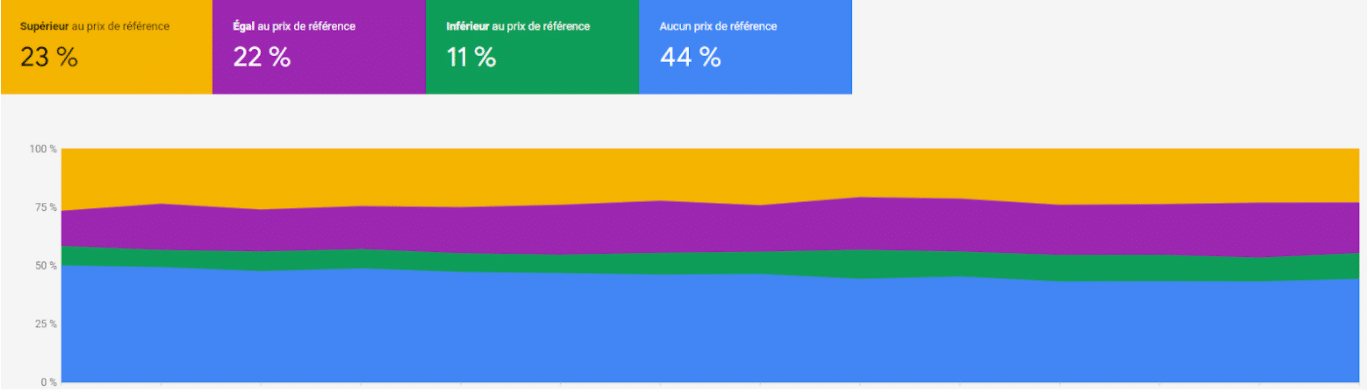
Available since 2019 under the “Growth” tab, these reports have recently been updated. Their data can now be exported through BigQuery in Google Cloud, making it possible, on the one hand, to perform advanced analyses and, on the other hand, to combine this data with merchants’ own data. In addition, the “Best sellers” report has been enriched with new data providing access to more information than before (size, color, gender, etc.).
The Market Insights program is available to all merchants with a Merchant Center account located in the following countries: United States, Germany, France, United Kingdom, Netherlands, Japan, Austria, Canada, Sweden, Italy, Spain, Switzerland, Denmark, Czech Republic, Belgium, and Russia.
Our advice:
If you have a Pricing team, it may be useful to share this market data with them.
Google Ads Insights
Google Ads has a similar tool. It gives merchants an overview of search trends based on queries performed on Google. Updated daily, this information applies both to the account as a whole and to Shopping campaigns.
In-Store Promotions
Promotional codes can now be highlighted directly in Local Inventory Ads (LIA), particularly to draw attention to a merchant’s own Shopping ads and encourage action, thereby improving the engagement rate. The main condition for accessing this new feature is to already have an LIA feed in place. The implementation and display process is the same as for promotional codes that merchants are likely already using in their Product Listing Ads (PLA).
Currently in beta, participation in this new program is, for the time being, subject to submitting a request form to Google and is only available in the following countries: United States, United Kingdom, Germany, France, India, Austria, and Canada.
New Version of Shopping Campaigns with Partners (Beta)
Specifically designed for brands and merchants wishing to optimize their Trade budget, Shopping Campaigns with Partners allow brands to boost advertising carried out by merchants for their own products using a dedicated budget. In return, merchants receive more traffic to their website for products receiving this additional budget.
Available only in beta and therefore subject to submitting a request form to Google, the new Google version offers the following advantages:
- Simplified setup for merchants;
- Improved bid management, allowing brands and merchants to manage their bids independently in order to achieve their respective objectives;
- Access to more information from Google in Google Ads reports to better understand the impact of brands’ contributions.
SCwP campaigns are compatible with both “standard” Shopping campaigns (PLA) and Smart Shopping campaigns.
This new feature is only available in the following geographical areas and countries: Europe, Middle East, Africa, Austria, Belgium, Germany, Denmark, Spain, France, United Kingdom, Ireland, Italy, Netherlands, and Turkey.
2021 promises many innovations that we have already had the opportunity to test as a partner agency. Many of them are still in beta and therefore depend on whitelisting.
Be sure to stay up to date and prioritize the new features to test according to their relevance to your sector, while always keeping your company’s objectives in mind.
For more information about these new features, you can consult Google Support or contact us.